TL;DR
Scan any site for free at framer.com/aeo to get an AI search score out of 100.
The score covers four areas: findable, quotable, trustworthy and understandable.
Use one H1 per page, because it is the clearest signal of what the page is about.
Add structured data to the head of every page, then test it with Google's Rich Results Test.
Fixing just those two things took my client site from 89 to 100.
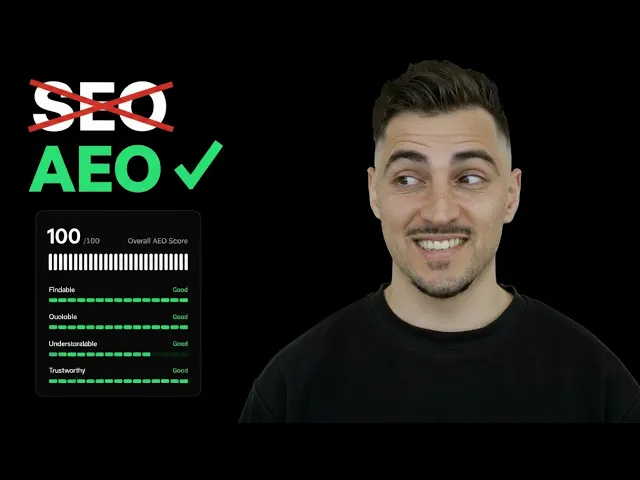
You can check if your website shows up in AI search by running it through Framer's free AEO scanner at framer.com/aeo. It gives you a score out of 100 and a list of what to fix. On a client site, fixing two things took my score from 89 to 100.
If AI tools like ChatGPT and Claude cannot read your site, it is less likely to be found. A low score means you are probably missing that traffic.
Most designers never check this. Here is how to run the scan and fix the two problems that cost me points.
What the AEO scanner checks
AEO stands for answer engine optimisation. It is how easily AI tools can find, read and quote your site.
The scanner rates your site on four areas: findable, quotable, trustworthy and understandable. Open each one to see its checks. Here are the ones I saw:
Area | What it looks at |
|---|---|
Findable | robots.txt, sitemap, AI crawlers allowed, HTTPS enabled |
Quotable | Meta description, enough real text, FAQ style content |
Understandable | A single H1 per page, structured data |
Other checks | Open graph tags, image alt text, internal links, external citations |
There is also a bonus check for an llms.txt file. It is extra, but you can add it too.
How to run the scan
I tested it on a new site I built in Framer for a client in Canada. They do paint protection film, window tinting and ceramic coatings for cars.
Go to framer.com/aeo.
Enter your website address.
Add your name and email.
Click scan your site.
Open each area to see which checks passed and which did not.
My client site scored 89 out of 100. Findable, quotable and trustworthy were all good. Understandable was only average.
The scanner said most websites score between 45 and 70. So 89 already put the site in the top 15%. But I wanted it at 100.
The two checks letting it down were a single H1 per page and structured data. The useful part is that Framer links to guidance on how to fix each one.
Fix your H1 headings first
The scanner looks for one descriptive H1 of reasonable length on each page. It is the clearest signal to AI of what the page is about.
The problem is easy to create by accident. You style a big heading lower on the page and reuse your H1 style. Now the page has two.
Open your site in Framer and go to the desktop breakpoint.
Click your main headline and check it uses the H1 tag.
Scroll down and click every other heading.
Set the rest to H2, H3 or H4 to match their place on the page.
If you do not need the style on a heading, just turn it off.
If a heading needs the H1 look, make a new style instead, such as an H4 in white bold.
Repeat on every page.
On my client site, a few headings further down were set to H1 by mistake. After fixing them and scanning again, the score jumped to 93. The single H1 check went to 5 out of 5. The score also turned green, which is a nice sign you are on track.
Add structured data to every page
Structured data is a script in the head of your page. It describes the business and the page in a format machines read easily.
Click the link next to the structured data check in your results. Framer shows you how to set it up and gives you an example script. I used Claude to write a script for each page with the real business details.
Then add it in Framer:
Go to your home page, click the three dots and open settings.
Go to Code and click add.
Give it a clear name.
Paste the script and set it to the end of the head tag.
Choose the page it belongs to and click save.
Add a new code snippet for each other page, named after that page.
Each page gets its own script. I also included the FAQ details on the pages that had them. Every script sits at the end of the head tag.
Test it before you rescan
Before you scan again, check the scripts actually work. Google has a free tool for this.
Search for Google Rich Results Test.
Paste in the link to your page.
Run the test and check the structured data comes back valid.
Publish your website so the live site has the new code.
Run the AEO scan again.
After publishing, my client site scored 100. That moved it into the top 5%. The structured data check now passed as well.
Run the Rich Results Test on each page, not just the home page. Every page has its own script, so each one is worth checking.
Why this matters for client work
A high score is proof the site you built actually works for your client. It is not just good looking. It can be found.
The fixes here are small. One H1 per page and a script in the head. Yet they were the only two things holding a good site back.
Run the scan before you hand any site over. It takes a minute and gives you a clear list to work through. If you would rather have a site built with this already done, that is the kind of work I do at Mura Studio.
The bottom line
Scan your site at framer.com/aeo to see how easily AI tools can find it. Fix your H1s, add structured data to every page and test it with Google. Two fixes took my client site from 89 to 100.
Questions, answered
What is an AEO score?
AEO stands for answer engine optimisation. An AEO score shows how easily AI tools like ChatGPT and Claude can find, read and quote your website. Framer's scanner gives you a score out of 100 with a list of checks to fix.
How do I check if ChatGPT can find my website?
Go to framer.com/aeo, enter your website, your name and your email, then click scan. It checks things like your robots.txt, sitemap, AI crawler access, headings and structured data.
How many H1 tags should a page have for SEO?
One. The scanner looks for a single descriptive H1 of reasonable length on each page. It is the clearest signal to AI of what the page is about. Make your main headline the H1 and set every other heading to H2, H3 or H4.
How do I add structured data to a Framer site?
Open the page settings, go to Code and add a new code snippet. Paste your structured data script, set it to the end of the head tag and choose the page it belongs to. Repeat for each page, then publish.
How do I test if my structured data works?
Search for Google Rich Results Test and paste in your page link. It checks the structured data on that page and tells you if it is valid. Publish your site first so the test sees the latest code.
What is a good AEO score?
The scanner told me most websites score between 45 and 70. My client site started at 89, which put it in the top 15%. After two fixes it reached 100 and the top 5%.

Written by Jeremy Mura
Brand designer, founder of Mura Studio and Designer School